What Is a Cross Sell Popup?
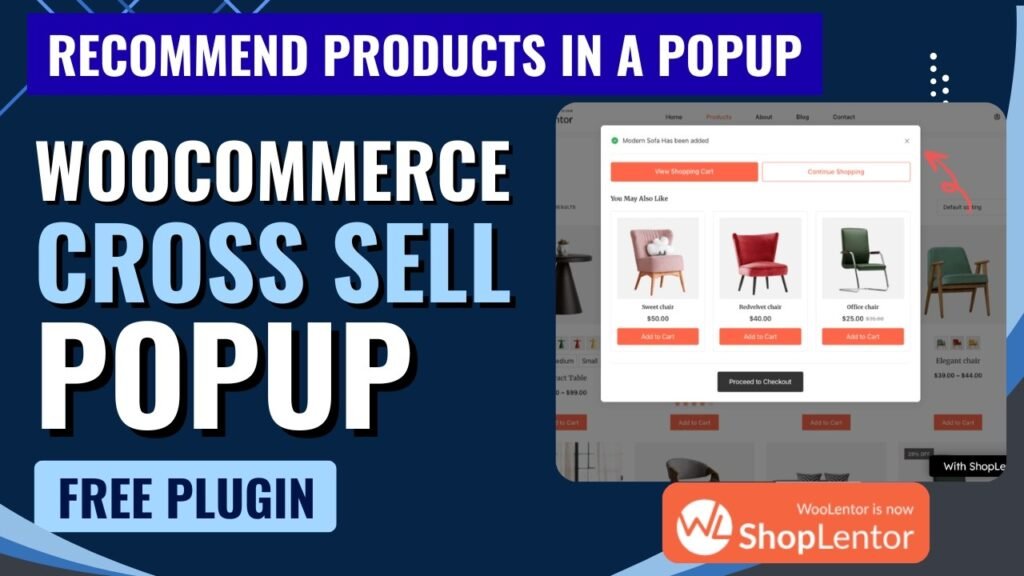
A cross sell popup is a targeted, timed overlay that appears on your WooCommerce store and suggests complementary or related products to a shopper at a strategic moment during their buying journey. Unlike static product recommendations hidden at the bottom of a product page, a cross sell popup actively interrupts — in a helpful, non-intrusive way — to make sure customers are aware of items that pair naturally with what they are already buying.
Think of it as the digital equivalent of a cashier saying: “You’re buying a camera — would you also like a memory card, a carrying case, or a lens cleaning kit?” The suggestion is relevant, timely, and adds real value to the customer’s purchase. When executed correctly, this simple technique turns single-product purchases into multi-item orders without requiring any extra traffic or advertising spend.
In the context of WooCommerce, cross selling is a native concept — WooCommerce allows store owners to manually assign cross-sell products to each item. However, out of the box, WooCommerce only displays these recommendations on the cart page, buried below the main cart table. A cross sell popup module like the one in ShopLentor takes this further by surfacing those recommendations at precisely the right moment — when a shopper adds a product to their cart, shows exit intent, scrolls to a certain point, or reaches a cart total threshold — as a visually engaging popup that demands attention.
Watch this step by step video tutroial: https://youtu.be/-MLPLYnWk5U
Cross Sell vs. Upsell: What’s the Difference?
Cross Sell | Upsell |
Suggests complementary / related products | Suggests a premium or upgraded version of the same product |
Adds new items to the order | Replaces the original item with a better one |
Example: Camera bag with a camera purchase | Example: 64GB camera instead of 32GB |
Increases order quantity | Increases order value per item |
Benefits of Creating a Cross Sell Popup in WooCommerce
Adding a cross sell popup to your WooCommerce store is one of the highest-return improvements you can make. It requires zero additional traffic, zero advertising spend, and zero technical complexity — yet delivers measurable and often dramatic improvements across your key revenue metrics. Here is a detailed look at every major benefit.
Increase Average Order Value (AOV)
This is the headline benefit and the reason most store owners implement cross sell popups. According to ShopLentor’s own data, stores using the Smart Cross-Sell Popup module see an average increase of 31% in average order value. When a customer who was planning to spend $40 adds a $15 accessory they did not originally consider, your revenue from that transaction increases by 37.5% — without acquiring any new customers. Multiply this across hundreds or thousands of orders per month, and the impact on annual revenue is substantial.
Reduce Cart Abandonment
Cart abandonment is one of the most painful problems for WooCommerce store owners. The ShopLentor Cross Sell Popup addresses this directly through its Exit Intent trigger — detecting when a customer’s cursor moves toward the browser’s close button or address bar and firing the popup at exactly that moment. By presenting an attractive, personalized product recommendation just as a customer is about to leave, you create one final opportunity to re-engage them. ShopLentor reports a 24% reduction in cart abandonment rates for stores using this feature.
Enhance the Shopping Experience
A well-implemented cross sell popup does not feel like an intrusion — it feels like helpful service. When a customer buys running shoes and your popup suggests moisture-wicking socks, compression insoles, and a hydration vest, you are genuinely helping them get more from their purchase. Customers who feel understood and served buy more, return more often, and leave better reviews. Cross selling done right transforms a transactional experience into a consultative one.
Drive Impulse Purchases
Impulse buying is a real and powerful psychological phenomenon in e-commerce. Customers are in an active buying mindset the moment they add a product to their cart — their intent to spend is already established, their credit card is essentially already out. A popup that presents a relevant, attractively priced complementary product at this exact moment capitalizes on buying momentum. The friction of the purchase decision is dramatically lower than it would be for a cold product page visit.
Improve Product Discovery
Many shoppers on WooCommerce stores have no idea how extensive your product catalogue is. They find one item, buy it, and leave — never discovering the dozens of complementary products that could have added real value to their purchase. Cross sell popups are one of the most effective product discovery tools available. By surfacing category-based or custom-curated product recommendations, you expose customers to items they would otherwise never have found.
Maximize Revenue From Existing Traffic
Paid advertising, SEO, and social media campaigns are all expensive, time-consuming strategies for growing revenue. Cross selling is fundamentally different — it generates more revenue from the visitors you are already converting. Every customer who completes a purchase and sees a cross sell popup is a warm, active buyer. Converting even 10-15% of those customers into multi-item buyers can have a more significant revenue impact than increasing traffic by 20%.
31% Higher Average Order Value | 24% Reduced Cart Abandonment | 100% Customizable Experience |
Key Features of ShopLentor Smart Cross Sell Popup
ShopLentor’s Smart Cross-Sell Popup module — available completely free in the ShopLentor plugin — is packed with features that give WooCommerce store owners enterprise-level cross selling capabilities without any premium subscription required. Here is a complete breakdown of every feature and what it means for your store.
Feature | What It Does |
Multiple Trigger Options | Control exactly when the popup fires: After Add to Cart, Exit Intent, Time Delay, Scroll Position, Cart Total threshold, or Before Checkout. Each trigger is designed for a different stage of the customer journey, giving you precision timing for maximum conversion impact. |
Flexible Product Sources | Choose what gets recommended: official WooCommerce Cross-sells, Up-sells, Related Products (algorithmically matched by category and tags), Custom Products (handpicked by you), or Category Products (any item from a selected category). This gives you full control over your recommendation strategy. |
Customizable Popup Design | Adjust the popup width to fit your layout, customize button colors to match your store theme, and control button hover colors for interactive polish. The design options ensure the popup integrates seamlessly with your brand rather than looking like a generic third-party overlay. |
Product Limit Control | Set the maximum number of products displayed in each popup, from 1 up to 8. Limiting recommendations to 3–4 products prevents decision paralysis and keeps the popup clean and focused, which typically yields the highest conversion rates. |
Custom Popup Title | Add your own attention-grabbing headline to the popup — for example, “Customers Also Bought” or “Complete Your Look” or “Don’t Forget These!” A strong title dramatically improves engagement and click-through rates. |
Direct Add-to-Cart Functionality | Customers can add recommended products to their cart directly from inside the popup without navigating to the product page. This removes friction from the impulse purchase process and significantly increases the likelihood of conversion. |
Mobile-Responsive Layout | The popup is fully responsive and adapts automatically to all screen sizes — smartphones, tablets, and desktops. Given that over 60% of e-commerce traffic now comes from mobile devices, this is a critical requirement for any serious store. |
Strategic Upselling Support | In addition to cross-sells, the module supports upsell recommendations — so you can guide customers toward premium product alternatives that deliver better margins for your store while offering genuine added value to the customer. |
Performance Analytics | Track the real impact of your cross-sell strategy through WooCommerce analytics integration. Monitor how many additional products are being added from popups, how this affects average order value, and which product combinations and triggers perform best. |
Popup Trigger Types — In Detail
Understanding each trigger type helps you choose the right one for your store’s goals and customer behavior patterns.
After Add to Cart
The popup appears immediately when a customer clicks the Add to Cart button. This is the highest-intent moment in the customer journey — the customer has just made a buying decision and is in active purchase mode. This trigger typically delivers the highest cross-sell conversion rates.
Exit Intent
The popup fires when the system detects the customer’s cursor moving toward the browser’s close button or URL bar, signaling they are about to leave. This is your last chance to present a relevant offer before the customer is gone.
Time Delay
The popup appears after a configured number of seconds has elapsed since the customer loaded the page. Useful for engaging customers who are browsing and considering but have not yet added anything to their cart.
Scroll Position
Triggers when the customer scrolls to a defined percentage of the page. Effective on long product pages or blog posts where customers who scroll deeply have demonstrated strong engagement and interest.
Cart Total
The popup activates when the cart value reaches a specific threshold. For example, you might trigger a popup when the cart hits $50 suggesting items that push the customer toward a $75 free-shipping threshold. This technique is highly effective at increasing order sizes.
Before Checkout
The popup appears when the customer navigates toward the checkout page. This is the final cross-sell opportunity and works well for low-cost impulse add-ons that are easy to say yes to at the last moment.
How to Create a Cross Sell Popup in WooCommerce Using ShopLentor
Setting up the Smart Cross-Sell Popup with ShopLentor takes less than 10 minutes and requires absolutely no coding or technical knowledge. Follow these steps to go from zero to a fully functional, revenue-generating cross sell popup on your WooCommerce store.
Step 1: Install the ShopLentor Plugin
Log in to your WordPress admin dashboard and go to Plugins > Add New. In the search bar, type ShopLentor (the plugin was previously known as WooLentor — both names may appear in search results). Click Install Now on the ShopLentor — WooCommerce Builder for Elementor result, then click Activate. The plugin is completely free and available directly from the official WordPress plugin repository.
Once activated, you will see a ShopLentor menu item appear in your WordPress admin sidebar. This is your central hub for all ShopLentor modules and settings.
Step 2: Assign Cross-Sell Products to Your WooCommerce Products
Before enabling the popup, you need to tell WooCommerce which products to recommend alongside each product. Go to Products in your WordPress admin and edit any product. Scroll down to the Product Data section and click on the Linked Products tab. In the Cross-sells field, search for and add the products you want to recommend when this item is in the cart. Save the product.
Repeat this process for your key products. Products that do not have cross-sells assigned will still work with the popup — you can use the Related Products, Custom Products, or Category Products source options instead — but setting proper cross-sells gives you the most targeted recommendations.
Step 3: Navigate to ShopLentor Modules
In your WordPress admin sidebar, click on ShopLentor. From the ShopLentor dashboard, navigate to the Modules section. ShopLentor organizes its features into a large collection of independent modules that you can enable or disable individually, keeping your site lean and fast.
Step 4: Enable the Smart Cross-Sell Popup Module
In the Modules list, scroll down or search for Smart Cross-Sell Popup. You will see a toggle switch next to the module name. Click the toggle to enable it. Once enabled, a Settings link will appear next to the module — click it to open the configuration panel.
Step 5: Configure General and Product Settings
In the Smart Cross-Sell Popup settings panel, configure the following options:
- Popup Title: Enter the headline text for your popup. Something like “Customers Also Bought” or “You Might Also Need” works well. Keep it short, friendly, and action-oriented.
- Product Limit: Set how many products appear in the popup. Start with 3 or 4 for the best balance between variety and clarity. You can test different numbers and see what converts best for your audience.
- Trigger Type: Select when the popup fires. For most stores, After Add to Cart is the recommended starting point. If reducing cart abandonment is your primary goal, try Exit Intent. If you want to increase average order value with a minimum spend incentive, use Cart Total.
- Product Source: Choose what gets recommended. If you have properly configured WooCommerce cross-sells, select Cross-sells. If not, Related Products is a smart automatic option that uses WooCommerce’s built-in category and tag matching algorithm.
Step 6: Configure Style Settings
Switch to the Style Settings tab to customize the popup’s appearance:
- Popup Width: Set the popup width in pixels. A width of 500–700px works well for most store designs on desktop, with the mobile-responsive layout automatically adapting for smaller screens.
- Button Color: Choose a color for the Add to Cart buttons inside the popup. Use your store’s primary brand color for consistency.
- Button Hover Color: Set the hover state color for the buttons to make them feel interactive and polished.
Step 7: Save Settings and Test
Click Save to apply your settings. Then open your store’s frontend, add a product to the cart, and verify that the popup appears as expected. Check that the recommended products are correct, the popup title is displaying, and the Add to Cart buttons inside the popup work correctly. Also test on a mobile device to confirm the responsive layout is working.
Step 8: Monitor Performance and Optimize
After going live, monitor your WooCommerce analytics to track changes in average order value and cart addition rates. Over the following weeks, experiment with different trigger types, product sources, and popup titles to find the combination that delivers the best results for your specific store and audience. The ShopLentor Smart Cross-Sell Popup is fully adjustable at any time — there is no risk in testing different configurations.
Frequently Asked Questions
Q1: Is the ShopLentor Smart Cross-Sell Popup feature available for free?
Yes, completely. The Smart Cross-Sell Popup is one of the modules included in the free version of the ShopLentor plugin. You do not need to purchase any Pro plan to use this feature. Simply install the free ShopLentor plugin from the WordPress repository, activate the module, configure your settings, and your cross sell popup is live. ShopLentor also offers a Pro version with additional advanced modules, but the cross sell popup is not gated behind a paywall.
Q2: Will the cross sell popup slow down my WooCommerce store?
No. ShopLentor’s modules are independently toggleable, meaning only the modules you enable are loaded. The Smart Cross-Sell Popup module is lightweight and only fires its scripts under the specific trigger conditions you define — it does not run continuously in the background. Additionally, ShopLentor is used by over 100,000 active WordPress installations, and performance is a core design priority for the team. For best results, always use a caching plugin and optimized hosting regardless of which plugins you run.
Q3: How do I decide which trigger type to use for my store?
The best trigger depends on your primary goal. If your goal is to increase average order value, the After Add to Cart trigger is the most effective because it catches customers at peak buying intent. If your goal is to reduce cart abandonment, Exit Intent is your best option. If you want to incentivize customers to spend more to reach a free-shipping threshold, the Cart Total trigger is ideal — for example, showing a popup with low-cost add-ons when the cart hits $45 and your free-shipping threshold is $50. You can experiment with multiple configurations over time to find what works best for your specific customer behavior.
Q4: Can I show different cross sell products for different product categories?
Yes. ShopLentor’s Smart Cross-Sell Popup supports Category Products as a product source, which allows you to display items from a specific product category in the popup. Additionally, you can use the Custom Products source to handpick exactly which items appear. For the most targeted approach, assign WooCommerce cross-sell products individually to each of your products via the Linked Products tab in the product editor — this gives you full product-by-product control over what gets recommended.
Q5: Does the cross sell popup work with all WooCommerce themes and page builders?
Yes. The ShopLentor Smart Cross-Sell Popup is a standalone module that operates independently of your theme and page builder. It works with any WooCommerce-compatible WordPress theme — Astra, OceanWP, Flatsome, Storefront, and all others. It is also compatible with Elementor, Gutenberg, and other page builders since the popup is rendered via WooCommerce hooks rather than being injected into a specific page builder layout. As long as WooCommerce is active and properly configured, the popup module will work.
Final Verdict: Why ShopLentor Is the Best Free Cross Sell Popup Solution for WooCommerce
In a market where most premium WooCommerce plugins charge $50–$200+ per year for cross selling features, ShopLentor stands out by offering a fully capable, production-ready Smart Cross-Sell Popup module completely free of charge. With six different trigger types, five product source options, full design customization, mobile responsiveness, and direct add-to-cart functionality from within the popup — this module competes directly with paid alternatives and wins on almost every metric.
The numbers speak for themselves: a 31% increase in average order value and a 24% reduction in cart abandonment are not marginal improvements. For a mid-size WooCommerce store processing 500 orders per month with an average order value of $60, a 31% AOV increase translates to an additional $9,300 in monthly revenue — from the same traffic, the same products, and a free plugin.
If you run a WooCommerce store and you are not yet using a cross sell popup, there is no reason to wait. ShopLentor is free, takes under 10 minutes to set up, requires no coding, and starts working the moment your first customer adds a product to their cart. The only question is how much additional revenue you have been leaving on the table