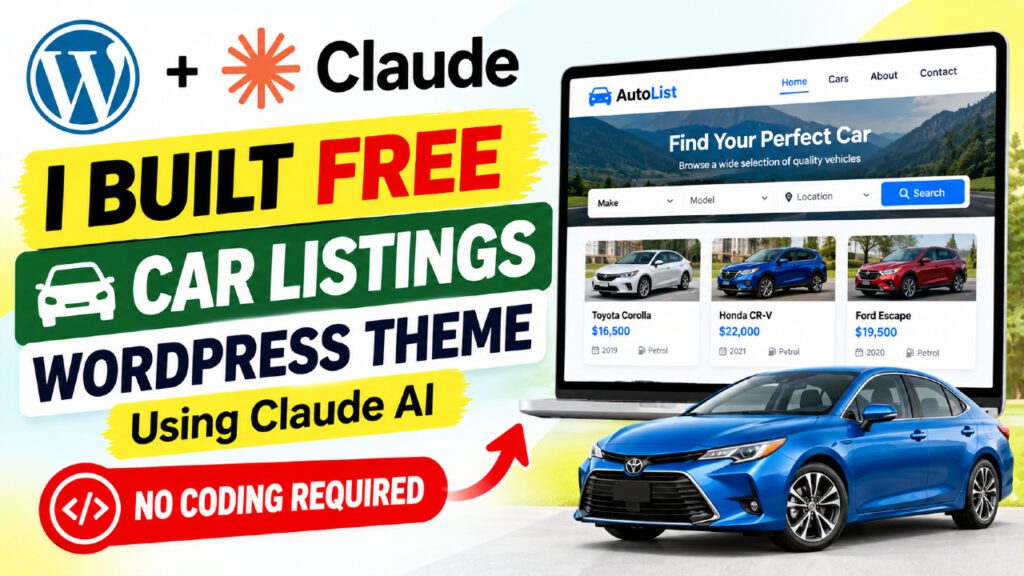
Building a custom WordPress theme from scratch used to take weeks of work. Today, you can build a WordPress theme with Claude AI in a single focused session — and the result is a fully functional, production-ready theme complete with custom post types, AJAX-powered search, a WordPress Customizer, a one-click demo content installer, and an integrated blog. In this guide we walk through exactly how we created the QT Car Listings WordPress Theme v1.9 using Claude AI, from the first architecture prompt to a packaged ZIP file ready for client delivery. Whether you are a freelancer who builds niche themes for clients, a developer curious about AI-assisted coding, or a WordPress enthusiast who wants to skip the boilerplate — this tutorial covers everything you need.
Table of Contents
What Is Claude AI and Why Use It for WordPress Development?
Claude AI: More Than a Code Generator
Claude AI, developed by Anthropic, is one of the most capable large language models available today. Unlike general-purpose chatbots, Claude excels at producing large volumes of structured, syntactically correct code in a single response. You can paste a 500-line specification into a Claude prompt and receive a complete, working PHP file in return — with every requirement addressed in the right order.
For WordPress theme development, where a single project might require a dozen interrelated PHP template files, hundreds of lines of CSS, multiple JavaScript modules, AJAX handlers with nonce verification, and a Customizer configuration, this capability is transformative.
Why WordPress Developers Are Turning to Claude AI
Traditional WordPress theme development requires mastery of the template hierarchy, the hook system, the Customizer API, meta box registration, taxonomy architecture, and increasingly the Gutenberg block editor. For freelancers building one-off niche themes, the setup time alone can consume half the project budget before any client-specific functionality is written.
Claude AI changes the economics entirely. Instead of writing hundreds of lines of boilerplate, you write a detailed specification — a prompt — and Claude produces working code. You focus on the architecture decisions and the features. Claude handles the syntax.
💡 Key insight: Claude works best for WordPress theme development when you provide a complete architecture-level prompt rather than asking for one file at a time. Specify the full feature list, all file names, the design system, every CPT and taxonomy, all AJAX actions, and every constraint upfront. The output quality scales directly with the specificity of the input.
Claude AI vs Other AI Coding Tools for WordPress
Factor | Claude AI | ChatGPT-4o | GitHub Copilot |
Context window | Very large (200K+) | Large (128K) | File-level only |
Full theme generation | ✅ Excellent | ✅ Good | ⚠️ Partial |
Instruction following | ✅ Very precise | ✅ Good | ⚠️ Variable |
PHP / WP expertise | ✅ Strong | ✅ Good | ✅ Good |
Free tier | ✅ Yes | ✅ Yes (limited) | ❌ Paid only |
Long doc generation | ✅ Best in class | ⚠️ Good | ❌ Not designed for it |
Why Build a Car Listings WordPress Theme from Scratch?
The Problem with Off-the-Shelf Directory Themes
Premium WordPress car listing themes typically cost $59 to $249 from marketplaces like ThemeForest. They are often bloated with features you will never use, dependent on specific page builders like Elementor or WPBakery, and difficult to customize beyond surface-level color changes. When a client needs a specific feature, you are stuck filing a support ticket and waiting — or hiring a developer to override hundreds of existing styles and hooks.
Building your own theme from scratch — with Claude AI doing the heavy lifting — gives you total control. Every feature is intentional. Every line of CSS serves a purpose. There are no framework overheads, no plugin conflicts from a bundled mega-menu plugin, and no licensing restrictions.
What Makes a Car Listings Theme Different from a Standard Theme
A car listings theme is a niche directory theme. It needs to solve a specific set of problems that standard WordPress themes are not designed for:
- A Custom Post Type for cars with 20+ custom meta fields (price, year, mileage, engine size, VIN, etc.)
- Multiple taxonomies for filtering by make, body type, and fuel type
- AJAX-powered search and filtering without full page reloads
- A gallery system with a main image and clickable thumbnail strip
- A finance calculator embedded on each listing page
- A dealer contact form with phone and WhatsApp integration
- A one-click demo content installer with real Unsplash stock images
- A shortcode system for displaying listings on any page or post
None of these features exist in a standard WordPress theme. Buying a premium theme to get them means accepting thousands of lines of code you did not write, cannot fully understand, and cannot freely redistribute.
🎯 The QT Car Listings theme delivers all of these features in a codebase you own outright — built with Claude AI at zero development cost beyond your time.
How We Built the QT Car Listings Theme Using Claude AI — Step by Step
Step 1: Writing the Master Architecture Prompt
The single most important factor in producing a working WordPress theme with Claude AI is the quality of the initial prompt. We did not ask Claude to “build a car listings theme.” We wrote a 600-line specification document that described every aspect of the theme architecture before a single line of code was generated.
The specification covered ten areas in detail:
- File structure — every PHP template file, the assets directory, JS and CSS files
- Design system — all CSS custom property names, color values, font choices, and component styles for car cards, the archive sidebar, and the single listing page
- php architecture rules — specific constraints that prevent the most common fatal errors
- CPT and taxonomy definitions — post type slug, capability type, archive slug, all taxonomy names and slugs
- All 20+ meta fields — field names, types, labels, and which meta box they belong to
- All AJAX actions — action name, nonce key, accepted parameters, expected JSON response format
- Shortcodes — names, accepted parameters, and the expected HTML output structure
- Demo content — exact car titles, Unsplash photo IDs, prices, specs, and agent details for 12 listings
- Page content — complete Gutenberg block markup for each of 5 demo static pages
- Customizer sections — all settings keys, type, default values, and how each maps to inline CSS
Step 2: Generating Each File in the Right Order
We generated files in a deliberate sequence. functions.php came first because it defines the foundational architecture — the CPT, taxonomies, hooks, and AJAX actions that every template file depends on. style.css came second to establish the complete design system before any template referenced a CSS class. Template files came last.
This order matters. When Claude generates template files after seeing functions.php, it naturally uses the correct function names, nonce keys, and AJAX action names already established in context — eliminating a whole category of name mismatch errors.
Step 3: Iterative Debugging with Claude
No AI-generated WordPress theme works perfectly on the first activation. The debugging phase is where most of the refinement happens, and Claude is just as valuable here as during initial generation.
Our approach to debugging was simple: describe the error precisely, paste the relevant code block, and ask for a surgical fix. We never asked Claude to rewrite an entire file to fix a single bug. We targeted the specific lines causing the problem, applied the fix, and moved on.
⚠️ The three most common errors in Claude-generated WordPress themes: (1) an unescaped single quote inside a PHP single-quoted string in a page content function, (2) require_once calls at the top level of functions.php rather than inside function bodies, and (3) anonymous closures passed to add_action rather than named functions. All three cause white-screen fatal errors.
Step 4: Iterating Through Versions
We built the theme across five incremental versions — v1.5 through v1.9. Each version fixed a specific category of problems and added a new layer of features:
- 5 — First version that activated without fatal errors. Basic CPT, archive, and single template.
- 6 — Fixed PHP string escaping crash. Added reliable stock image system using the external URL meta fallback.
- 7 — Added AJAX sidebar filters to the archive page and finance calculator on single listing pages.
- 8 — Fixed the Gutenberg full-width layout. Created front-page.php to prevent page.php from boxing the homepage content.
- 9 — Added the complete blog section with home.php (blog listing), single.php (single post), demo blog posts with Gutenberg content, and Blog link in the main navigation.
Complete Feature Breakdown: What the Theme Can Do
Custom Post Type: Car Listing
The car custom post type uses the slug /listing/ for its archive URL and supports the title, editor, thumbnail, and excerpt fields. It is fully integrated with the WordPress REST API, which means the Gutenberg block editor works on car post editing screens without any additional configuration.
Three Taxonomies with Dedicated Archives
The theme registers three taxonomies, each with its own taxonomy.php archive template and clean URL structure:
- car_make — Hierarchical taxonomy for vehicle brands (BMW, Ford, Toyota) at /make/
- car_body_type — Hierarchical taxonomy for body style (SUV, Sedan, Pickup) at /body-type/
- car_fuel — Flat taxonomy for fuel types (Petrol, Diesel, Electric, Hybrid) at /fuel/
Four Meta Boxes with 20+ Custom Fields
Four meta boxes appear on the car editing screen: Car Details (a 16-field two-column grid covering price, year, mileage, engine size, transmission, drive train, exterior and interior color, doors, seats, VIN, and condition), Car Features (five textarea groups for Safety, Interior, Exterior, Mechanical, and Technology features stored as arrays), Car Gallery (a multi-image WordPress media selector), and Dealer Info (six contact fields including WhatsApp number).
The Single Car Detail Page
The single-car.php template renders one of the richest detail pages available in any free WordPress directory theme:
- Full-width gallery: a 440px main image with a 5-column clickable thumbnail strip below it
- Sticky sidebar contact box with agent photo, name, badge, phone, WhatsApp, and an AJAX enquiry form
- Six tabbed content panels: Overview (spec table), Description, Features (with 5 sub-tabs), Finance Calculator, Location Map, and Reviews
- Finance calculator using the standard M = P[r(1+r)^n] / [(1+r)^n – 1] formula with live output
- Related cars section showing 3 listings from the same make or body type
Archive Page with AJAX Sidebar Filters
The archive-car.php template provides a two-column layout: a 280px fixed sidebar with dropdown filters for make, body type, fuel type, condition, year range, and price range, and a main content area with a results count, sort dropdown, grid/list toggle, and AJAX-rendered car cards. All filtering happens without a page reload.
WordPress Customizer with 5 Sections
The theme registers a dedicated QT Car Listings Customizer panel with five sections: Colors (8 color pickers including accent, header, and footer background), Typography (font family selector and base size), Header Settings (transparent header toggle, CTA button text and URL), Footer Settings (tagline, social links), and Homepage Settings (hero title, hero subtitle, CTA text). All changes preview in real time.
Blog Section
Version 1.9 added a complete blog section with a dedicated home.php template for the blog listing page (large featured post, 3-column card grid, pagination), a single.php template for single posts (hero with category badge and date, reading time, author card, related posts), and three demo blog posts with full Gutenberg block content and featured images.
The Demo Content System: 12 Car Listings, Pages, and Blog Posts
One-Click Demo Installer
Activating the QT Car Listings theme triggers a full-screen demo wizard overlay the first time an admin visits the dashboard. Clicking “Yes, Install Demo Content” creates 12 car listings with stock images, 5 static pages (Home, About, Contact, Sell a Car, FAQ), a blog page, 3 blog posts, all taxonomy terms, and sets the WordPress reading settings to use the static homepage automatically.
The entire process runs from a single function called exclusively from the admin_init hook. It never runs during front-end page loads — a critical constraint for performance and reliability on shared hosting.
12 Real Demo Car Listings with Unsplash Images
Car | Make | Condition | Status | Price |
2022 Ford GT White Edition | Ford | New | Featured | $485,000 |
2024 BMW X5 xDrive40i | BMW | New | Active | $72,500 |
2021 Toyota Camry SE Hybrid | Toyota | Used | Active | $28,900 |
2023 Tesla Model S Plaid | Tesla | New | Featured | $94,000 |
2020 Mercedes-Benz C300 AMG | Mercedes-Benz | Used | Great Price | $35,500 |
2023 Audi Q7 55 TFSI Quattro | Audi | New | Active | $68,000 |
2022 Ford F-150 Raptor | Ford | New | Active | $55,000 |
2024 Porsche 911 Carrera S | Porsche | New | Featured | $135,000 |
2021 Honda CR-V EX-L AWD | Honda | Used | Active | $26,500 |
2023 Lamborghini Urus Performante | Lamborghini | New | Featured | $240,000 |
2023 Chevrolet Corvette Z06 | Chevrolet | New | Active | $112,000 |
2024 Mercedes-Benz EQS 580 | Mercedes-Benz | New | Featured | $118,000 |
Reliable Stock Images: The External URL Fallback Pattern
Demo images present a common reliability problem on shared hosting. The WordPress media_sideload_image() function downloads images from a URL and imports them as proper featured images — but many shared hosting environments block outbound HTTP connections from PHP.
The solution is a two-step approach that guarantees images always display regardless of server configuration:
- Store the Unsplash URL directly in post meta using update_post_meta($post_id, “car_ext_image_url”, $url) — this happens first, before any download attempt
- Attempt to download the image into the WordPress media library as a proper featured image using media_sideload_image()
- If the download succeeds, the featured image is used. If it fails, the card template reads car_ext_image_url and uses it as a direct img src attribute
This pattern is the single most important reliability fix in the entire theme. Without it, every demo listing shows a gray placeholder box on hosting environments that restrict outbound connections.
Gutenberg-Ready Demo Pages
All five demo static pages are built entirely with native WordPress Gutenberg blocks — wp:cover for the hero section, wp:columns for multi-column layouts, wp:details for FAQ accordions, wp:shortcode for inserting car listings. There is no custom PHP template switcher, no hardcoded per-page output. The page content is stored as proper block markup in the WordPress database and is fully editable in the block editor without touching a single line of PHP.
The Shortcode System: Display Listings Anywhere
Seven Shortcodes, One Help Page
The theme includes seven shortcodes registered with add_shortcode() and documented in a dedicated admin submenu page at Car Listings > Shortcodes & Help. The help page shows every shortcode with its parameters, all valid taxonomy slugs (generated dynamically from the actual terms in the database), and step-by-step instructions for using shortcodes inside the Gutenberg block editor.
Shortcode | Description | Usage Example |
[qtcl_featured_section] | Featured grid with AJAX filter chips and sort | [qtcl_featured_section] |
[qtcl_new_arrivals_section] | Latest listings grid | [qtcl_new_arrivals_section] |
[qtcl_brands_section] | Brand cards showing car count per make | [qtcl_brands_section] |
[qtcl_for_sale count=”6″] | For Sale listings only | [qtcl_for_sale count=”6″] |
[qtcl_for_rent count=”6″] | For Rent listings only | [qtcl_for_rent count=”6″] |
[qtcl_by_type type=”suv”] | Filter by body-type slug | [qtcl_by_type type=”suv” count=”3″] |
[qtcl_listings] | Full shortcode with all available parameters | [qtcl_listings type=”sedan” status=”featured” count=”4″] |
📖 The shortcodes help page in the WordPress admin is dynamically generated — it queries the actual car_make, car_body_type, and car_fuel terms in the database and displays their slugs in real time. This means the slug reference tables stay accurate even after the demo content is customized.
Key Advantages of Building WordPress Themes with Claude AI
Speed: From Idea to Working Theme in Hours, Not Weeks
A WordPress developer working manually might spend 40 to 80 hours building a theme with this level of functionality. With Claude AI, the initial generation of all theme files takes 2 to 4 hours. Debugging and iterative refinement adds another 2 to 4 hours. Total: under 8 hours for a production-ready theme that would cost $5,000 to $15,000 to commission from a specialist agency.
Zero Framework Overhead
Commercial directory themes are built on frameworks like Redux Framework, CMB2, or Kirki. These add hundreds of kilobytes and dozens of PHP files to manage. A Claude-generated theme is vanilla WordPress — standard wp_enqueue_scripts(), native add_image_size(), the core Customizer API. There is no framework to update, no compatibility to maintain, and no premium license to renew. The QT Car Listings theme is under 1.7MB as a complete ZIP archive.
Total Code Ownership
When you buy a commercial theme, you license it. The code belongs to the developer. You cannot resell it, white-label it for clients, or deploy it across unlimited sites without paying additional license fees. A theme you build with Claude AI is yours outright. Sell it to clients, include it in service packages, charge recurring maintenance fees — there are no licensing restrictions.
Precise Feature Control
Commercial themes include features you will never use — booking systems, WooCommerce integrations, multi-language frameworks, RTL layout support — and the overhead of all that code sits on every page load. A Claude-generated theme includes exactly the features specified in the prompt and nothing more. Every function has a purpose. Every CSS class is used.
Rapid Iteration
Need to add a feature after launch? Open Claude, paste the relevant section of functions.php, describe the new feature, and integrate the output. The same workflow that built v1.0 through v1.9 of QT Car Listings continues indefinitely. You are never waiting for a theme developer to prioritize a feature request.
Learning Through Output
Reviewing Claude-generated WordPress code is one of the most effective ways to understand WordPress development. The output follows WordPress coding standards, uses correct hook priorities, handles data sanitization properly, and documents its own logic in inline comments. Developers who build themes this way consistently report stronger understanding of the WordPress Plugin API than they gained from years of following conventional tutorials.
📈 Freelance advantage: Developers who build niche WordPress themes with Claude AI can deliver custom theme development at project rates that premium theme developers cannot match, while maintaining higher margins than developers who code manually.
Common Pitfalls When Building WordPress Themes with Claude AI
The Fatal Single-Quote String Error
The most common crash in Claude-generated themes is an unescaped single quote inside a PHP single-quoted string. This happens most often in the page content generator function, where long strings of HTML containing attributes (style=’…’ or onclick=’…’) are assembled as PHP string values. The solution: use PHP heredoc syntax (<<<EOT) for all multi-line HTML strings, or write the content to a temp file and inject it using Python string replacement.
require_once at the Top Level of functions.php
Placing require_once calls at the top level of functions.php — loading a customizer.php or demo-content.php from a subfolder — causes fatal errors because the required file executes before WordPress finishes loading. The architectural rule: all functionality belongs in one functions.php. If require_once is absolutely necessary, place it inside a function body where it executes at the correct point in the WordPress load cycle.
The Demo Installer Running at Page Load
If the demo installer function executes at page load rather than from an admin_init hook, it creates duplicate content on every page visit and can timeout on shared hosting with a 30-second limit. Always gate the installer: add_action(“admin_init”, “qtcl_admin_init”) where qtcl_admin_init checks for an action query parameter and verifies a nonce before calling the install function.
Anonymous Functions in add_action
Using add_action(“after_switch_theme”, function() { … }) creates hooks that cannot be removed, cause issues with certain caching plugins, and complicate debugging. Always use named functions: add_action(“after_switch_theme”, “qtcl_after_switch”). This is one of the architecture rules to specify explicitly in the initial prompt.
The Boxed Homepage Layout
When WordPress is configured to use a static front page (Settings > Reading), it uses front-page.php. If the theme does not have front-page.php, WordPress falls back to page.php — which typically wraps content in a narrow container. The fix is a three-line front-page.php that calls get_template_part(“index”), ensuring the homepage always uses the dynamic template with its full-width sections regardless of WordPress reading settings.
This was one of the most confusing bugs we encountered, because the site looked correct on the blog index but boxed on the static homepage. The root cause was not a CSS problem but a WordPress template hierarchy routing issue.
Who Should Build WordPress Themes with Claude AI?
Freelancers Building Niche Directory Sites
If you build directory websites for clients — car dealers, real estate agents, restaurant owners, event organizers, hotel properties — Claude AI lets you build custom themes that feel premium and purpose-built without the premium price tag. You can deliver a unique, fully owned theme for a fraction of what a marketplace theme costs, while maintaining complete control over every feature and maintaining margin.
WordPress Developers Who Want to Move Faster
Even experienced WordPress developers benefit from Claude AI for the boilerplate-heavy parts of theme development: meta box registration, Customizer section scaffolding, AJAX handler setup, and demo content generation. Claude handles the repetitive scaffolding in seconds, freeing experienced developers to focus on the architectural decisions that require genuine expertise.
Content Creators with Specific Site Requirements
If you run a car review site, a used vehicle marketplace, or an automotive news blog, and you want a theme built around your exact content structure rather than adapted from a generic theme, Claude AI is genuinely accessible even without development experience. You need a detailed specification, a Claude account, and a willingness to iterate.
Agencies Building Scalable Theme Libraries
Digital agencies can use Claude AI to build proprietary libraries of niche themes — car listings, property directories, job boards, restaurant guides — and include them as part of client onboarding packages. The investment in building each theme is measured in hours rather than sprints, and the result is an owned asset rather than a licensed product that the agency cannot resell.
Frequently Asked Questions
Can I build a WordPress theme with Claude AI for free?
Yes. Claude offers a free plan that is sufficient for generating complete WordPress theme files, PHP templates, JavaScript, and CSS. The QT Car Listings theme was built entirely using Claude at zero cost beyond the cost of WordPress hosting.
Do I need coding experience to build a WordPress theme with Claude AI?
You need basic familiarity with WordPress file structure and how to install a theme via the WordPress dashboard. You do not need to write code yourself. Claude generates all the PHP, CSS, and JavaScript. The more detailed and precise your initial prompt, the more accurate and reliable the generated code will be.
How long does it take to build a full WordPress theme with Claude AI?
A basic theme with a custom post type, archive template, and single template takes under 2 hours. A full niche directory theme with AJAX filtering, a mortgage or finance calculator, demo content installer, a Customizer, and a complete blog section takes 4 to 6 hours of total time including testing and iterative debugging. This compares to 40 to 80 hours for a developer building the same theme manually.
What is the most important rule for Claude-generated WordPress themes?
All functionality must live in a single functions.php file. Never place require_once at the top level of that file — only inside function bodies. Use named functions rather than anonymous closures in all add_action calls. Ensure the demo content installer is only called from admin_init, never at page load. Specifying these rules explicitly in the initial prompt prevents the most common fatal errors before they are generated.
Can I sell a WordPress theme I built with Claude AI?
Yes. Code generated by Claude can be used commercially. You own the output. Many freelancers and agencies build custom niche themes with AI assistance and charge clients for them. Always review and test generated code before selling or deploying it to ensure quality, security, and compatibility.
How do demo car images display reliably across different server configurations?
The theme stores the Unsplash image URL directly in post meta as a fallback using update_post_meta immediately, before attempting any download. If WordPress cannot download the image into the media library — common on shared hosting environments that restrict outbound PHP connections — the card template reads this post meta value and uses it as a direct img src attribute. Images always display, regardless of server configuration.
Can I use this approach for other niche directory WordPress themes?
Absolutely. The same architecture was adapted to build QT Property Listings, a full property listings theme with For Sale / For Rent tabs, property types, mortgage calculator, map integration, and 12 demo properties with Unsplash images. The same approach scales to any niche directory: job boards, restaurant guides, event calendars, hotel directories, and more.
Where can I watch the complete tutorial video?
The full step-by-step tutorial showing how we built QT Car Listings using Claude AI is available on the Quick Tips YouTube channel at youtube.com/@ParamFreelance. The video covers the complete process from the initial prompt to the final packaged theme installation.
Conclusion: Build Your Own WordPress Theme Today
Building a complete, professional WordPress theme from scratch used to require months of development time and significant developer budget. Claude AI changes that equation entirely. As we demonstrated with the QT Car Listings theme, you can build a production-ready niche directory theme — with a custom post type, AJAX filtering, a Customizer, reliable demo content, a finance calculator, and a full blog — in a single focused session.
The key lessons from this project are straightforward: write a complete architecture prompt upfront, keep all functionality in a single functions.php, use the two-step image URL fallback for reliable demo content on any server, treat debugging as an iterative conversation with Claude, and build in versions — each one fixing a specific category of issues and adding the next layer of features.
The theme we built is fully yours to adapt — the CPT structure, the design system, the shortcode names, the taxonomy architecture — for any niche directory you can imagine. Freelancers, agencies, and WordPress developers who adopt this workflow gain a meaningful competitive advantage: the ability to deliver custom-quality niche themes at a speed and cost that no traditional development approach can match.
🚀 Ready to build? Watch the complete tutorial on the Quick Tips YouTube channel (@ParamFreelance), then use the detailed build prompt in the video description to generate your own version of QT Car Listings — or adapt it for your own niche directory. The full prompt covers every file, every function, and every architecture rule discussed in this article.