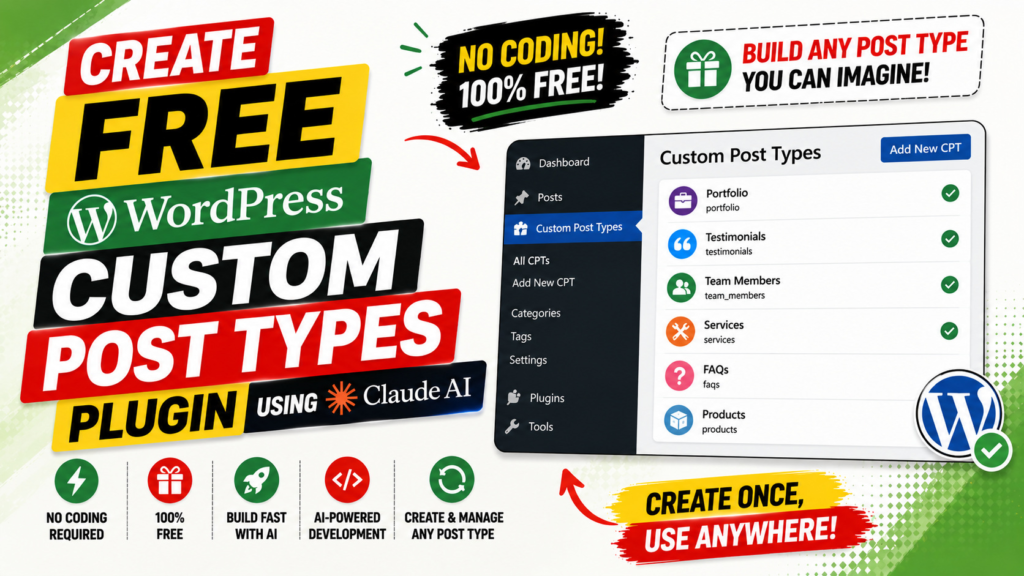
What if you could build your own free WordPress custom post types plugin — complete with custom fields, taxonomies, import/export, and a REST API — without writing a single line of PHP code? That is exactly what we did using Claude AI. In this guide you will learn what a custom post types plugin is, why every serious WordPress site needs one, every feature the QT Custom Post Types plugin includes, and the exact step-by-step process used to build it from a plain-English prompt. Whether you are a freelancer, agency owner, or WordPress enthusiast, this is the most practical AI-powered WordPress development tutorial you will read in 2026.
Table of Contents
What Is a WordPress Custom Post Types Plugin?
By default, WordPress gives you two content types: Posts and Pages. These work perfectly well for simple blogs — but what happens when you need to manage a portfolio, a product catalog, a real estate listing, a staff directory, or an event calendar? That is where custom post types come in.
Definition: What Is a Custom Post Type?
A custom post type (CPT) is a new category of content you register in WordPress beyond the built-in Posts and Pages. Each CPT gets its own admin menu item, its own list screen, its own editor, and its own archive URL — just like how Posts work, but tailored entirely to your use case.
What Is a Custom Post Types Plugin?
A custom post types plugin is a WordPress plugin that gives you a visual admin interface to create, configure, and manage custom post types without touching any PHP code. Instead of writing register_post_type() manually in your theme’s functions.php, you fill in a form and the plugin handles registration automatically on every WordPress page load.
The best custom post types plugins also include custom fields — additional data fields (text, images, dates, selects, etc.) that you can attach to any post type to capture and display structured information.
Custom Post Types vs. Default Posts and Pages
Feature | Default Posts | Custom Post Type |
Content type | Blog articles | Anything you define (Products, Events, etc.) |
Admin menu item | Posts | Your custom label |
Custom fields | Limited (native WP meta) | Unlimited (with CPT plugin) |
Custom categories | WordPress Categories | Custom taxonomies you create |
URL structure | /year/month/slug | /your-slug/post-slug |
REST API support | Built-in | Configurable |
Why Do You Need a Custom Post Types Plugin?
According to a 2026 industry report, 72% of WordPress developers prefer using a plugin for custom post type registration over writing manual PHP code — saving an average of 2–3 hours per project. Meanwhile, 60% of enterprise-level WordPress installations use five or more custom post types.
Option 1: Write PHP Code Manually
You can use the register_post_type() function in functions.php. This works well for experienced developers but requires ongoing maintenance, risks breaking on theme changes, and is inaccessible to non-coders.
Option 2: Buy a Premium Plugin
Advanced Custom Fields Pro costs $49/year per site. JetEngine costs $43/year. Toolset is paid-only. These are excellent tools, but they add recurring costs — especially painful when managing multiple client sites.
Option 3: Build Your Own Free Plugin with Claude AI
This is exactly what we did. By building your own plugin with Claude AI, you get:
- Full ownership — no subscriptions, no licensing restrictions
- Every feature you actually need — no bloat from unused features
- The ability to customise it exactly for your workflow
- Zero recurring costs across unlimited WordPress sites
Introducing the QT Custom Post Types Plugin
The QT Custom Post Types plugin is a production-ready, fully free WordPress plugin built entirely using Claude AI through a series of detailed conversational prompts. It was built and refined across multiple iterations — each version fixing real bugs discovered during live testing on a real WordPress installation.
The plugin was developed by Quick Tips (youtube.com/@ParamFreelance) and went through four versions (v1.0 through v1.3) before reaching its current stable state. Every bug fix was documented, making this one of the most thoroughly debugged AI-generated WordPress plugins available.
Plugin At a Glance
Detail | Info |
Plugin Name | QT Custom Post Types |
Version | 1.3 |
Author | Quick Tips (youtube.com/@ParamFreelance) |
License | GPL-2.0 (fully open source) |
Price | FREE — no premium tier |
Requires | WordPress 6.0+, PHP 7.4+ |
Built With | Claude AI (claude.ai) |
Field Types | 18 custom field types |
Complete Feature List
Here is every feature the QT Custom Post Types plugin includes out of the box:
Custom Post Type Manager
- Create unlimited custom post types from the WordPress admin UI — no code needed
- Set singular/plural labels, menu name, and icon (full Dashicons picker with live preview)
- Configure public visibility, archive pages, hierarchical structure, and REST API support
- Choose supported features: title, editor, thumbnail, excerpt, comments, revisions, and more
- Enable or disable any post type without deleting it
- Post types appear instantly in the WordPress sidebar after saving
Custom Fields — 18 Field Types
Attach field groups to any post type, page, or content area. All 18 field types render natively in the WordPress post editor:
Field Type | Description |
Text | Single-line text input with placeholder support |
Textarea | Multi-line text with configurable row count |
Number | Numeric input with min, max, and step controls |
Email address with native validation | |
URL | Web address with URL sanitisation |
Password | Masked text input |
Select | Dropdown menu with custom choices (value : Label format) |
Radio | Radio button group from custom choices |
Checkbox | Multi-select checkbox group, value stored as array |
True/False Toggle | Animated CSS toggle switch with custom Yes/No labels |
Date Picker | Native browser date picker |
Color Picker | WordPress wp-color-picker integration |
Image | WordPress Media Library picker with thumbnail preview |
File Upload | Any file type via WordPress Media Library |
WYSIWYG Editor | Full WordPress rich-text editor (TinyMCE) |
Relationship | Link post to one or multiple other posts (any post type) |
Taxonomy | Select from existing taxonomy terms |
Repeater | Repeatable group of sub-fields (add/remove rows dynamically) |
Custom Taxonomies (Category Filtering)
- Create custom hierarchical taxonomies (category-style) for any post type
- Attach native WordPress Categories and Tags to custom post types
- Taxonomy appears as a sub-menu item under the post type in the sidebar (e.g. Products > Product Categories)
- Checkbox panel in the post editor for assigning categories to posts
- Category column on the post list screen for quick visual filtering
- Full REST API and Gutenberg (block editor) support for every taxonomy
Import and Export
- Export all post types and field groups as a single JSON file with one click
- Import that file on any other WordPress site running the same plugin
- Perfect for moving configuration from local development to staging to production
- Handles all post types, field groups, and field definitions in one file
Developer Tools
- Auto-generated PHP code: the Tools page outputs copy-paste-ready register_post_type() functions
- Helper functions: qt_get_field(), qt_the_field(), qt_get_fields() for use in theme templates
- Shortcodes: [qt_field name=”field_name”] and [qt_image name=”field_name” size=”medium”]
- REST API endpoints: /wp-json/qt-cpt/v1/post-types and /wp-json/qt-cpt/v1/fields/{post_id}
- Full Gutenberg compatibility via show_in_rest — works with the block editor natively
Benefits of Using a Custom Post Types Plugin
Beyond obvious time savings, here is why a dedicated custom post types plugin transforms your WordPress workflow:
Organise Content the Way Your Site Actually Works
When all your content lives in the Posts list, everything becomes messy fast. Custom post types let you separate Products from Events from Team Members from Testimonials — each with their own list, fields, and URL structure. Your editorial team will thank you.
Add Structured Data to Any Content Type
Custom fields let you attach structured data to posts — a price field on a product, a start date on an event, a star rating on a review. That structured data can be displayed on the front end, exposed via the REST API for headless builds, or used in queries and filters.
Filter and Categorise Custom Content
Custom taxonomies make your content filterable — just like filtering blog posts by category, you can filter Products by Product Category, Events by Event Type, or Properties by Location. This improves both the admin experience and the front-end browsing experience.
No Theme Lock-in
Because post types and fields are registered by a plugin (not your theme), all your data survives a theme change. Switching from Divi to Elementor to a block theme does not wipe your custom content structure.
Works with Every WordPress Page Builder
The plugin exposes all custom field values through standard WordPress post meta and the custom REST API endpoints — so Elementor, Beaver Builder, Bricks, Divi, and Gutenberg can all access your fields through their dynamic data systems.
SEO and Headless CMS Ready
Every post type and taxonomy is REST API-enabled by default, making them immediately available for headless WordPress setups using Next.js, Nuxt, Astro, or any other front-end framework. The headless CMS market is growing at a 20.1% CAGR through 2030.
Step-by-Step: How We Built This Plugin with Claude AI
Here is the exact process used to build the QT Custom Post Types plugin — from a blank conversation to a downloadable, working ZIP file.
Step 1: Define the Plugin Features
Before opening Claude, we made a clear list of everything the plugin needed to do: create post types visually, manage custom fields, support 18 field types, handle taxonomies, include import/export, and provide REST API access. A clear specification upfront is what separates a working result from a broken one.
Step 2: Write a Detailed Prompt
We wrote a comprehensive prompt that included the plugin name, author, version, complete file structure, database schema, and five critical architecture rules based on known WordPress gotchas:
- Register admin_post_ hooks at the top level of the main plugin file — NOT inside the init action hook
- Cast all boolean arguments from JSON with (bool) before passing to register_post_type()
- Always explicitly set show_ui and show_in_menu — never rely on WordPress to infer them
- Access database rows as stdClass objects with -> notation, not as arrays with [] notation
- Call dbDelta() separately for each table — one call per CREATE TABLE statement, not a combined string
Step 3: Claude Generated All Plugin Files
Claude AI wrote every file: the main plugin file, three database classes, a post type manager, a field manager, a meta box renderer, a save handler, a REST API class, helper functions, five admin view templates, an admin class with all form handlers, two CSS files, and two JavaScript files — approximately 2,500 lines of production-quality, WordPress-standard code in a single session.
Step 4: Test and Iterate (Versions 1.0 to 1.2)
We installed the plugin on a live WordPress site and found three issues during real-world testing:
- 1 fix: Forms were not saving — the admin_post_ hook was registered inside init, which fires after admin-post.php routing
- 2 fix: Post types were not appearing in the sidebar — show_ui and show_in_menu were not explicitly set
- 2 fix: Database tables were not being created — dbDelta() cannot handle multiple CREATE TABLE statements in one string
Each bug was described in plain English to Claude. Each was fixed in a new version with a full explanation of the root cause — not just a patch.
Step 5: Add the Taxonomy Feature (Version 1.3)
After the core plugin worked correctly, we added the complete taxonomy system in a single follow-up session. Claude extended the existing codebase to include: custom taxonomy registration, native WordPress taxonomy attachment, the taxonomy card in the post type form, dynamic taxonomy row JavaScript, and the taxonomy column on the post list screen.
Step 6: Package and Download
Claude packaged all files into a correctly structured ZIP file with the right folder name, ready to upload to any WordPress site. No manual file editing or FTP required.
How to Install and Use the Plugin
Installation Steps
- Download the qt-custom-post-types.zip file
- Go to WordPress Admin > Plugins > Add New > Upload Plugin
- Choose the ZIP file and click Install Now
- Click Activate Plugin
- The QT Post Types menu appears in your WordPress sidebar immediately
Creating Your First Custom Post Type
- Go to QT Post Types > Post Types > Add New Post Type
- Enter the Post Type Slug (e.g. product) — lowercase, underscores only, max 20 characters
- Enter Singular Label (Product) and Plural Label (Products)
- Configure options: visibility, archive, REST API, Gutenberg support
- Choose supported features: title, editor, thumbnail, excerpt, etc.
- Optionally add custom taxonomies for category filtering
- Click Save Post Type — the post type appears in the sidebar on the next page load
Creating a Field Group
- Go to QT Post Types > Field Groups > Add New Field Group
- Enter a title for the group (e.g. Product Details)
- Set the location rule: Post Type = product
- Click + Add Field, choose a type, enter a label — the field name auto-generates
- Click Save Field Group
- Open any post of your custom type — the field group appears in the post editor
Using Custom Fields in Your WordPress Theme
Once fields are saved on a post, display their values anywhere in your theme:
PHP Helper Functions
<?php
// Get a field value (returns the raw value)
$price = qt_get_field( “price” );
// Echo a field value (escaped for safe output)
qt_the_field( “price” );
// Get ALL custom fields for a post as an array
$all_fields = qt_get_fields( get_the_ID() );
?>
Shortcodes (use in post content or widgets)
[qt_field name=”price”]
[qt_image name=”product_photo” size=”medium” class=”my-image”]
REST API (for headless WordPress or JavaScript)
GET /wp-json/qt-cpt/v1/post-types
GET /wp-json/qt-cpt/v1/fields/{post_id}
Advantages of Building WordPress Plugins with Claude AI
This project proved that Claude AI is a genuinely powerful tool for WordPress plugin development — not just for writing code snippets, but for building complete, production-ready plugins with proper architecture.
Full Plugin in One Session
Claude generated approximately 2,500 lines of structured PHP, JavaScript, and CSS in a single conversation. Traditional development of a plugin this size would take 20–40 hours for an experienced developer.
Deep WordPress Architecture Knowledge
When given proper specifications, Claude understands WordPress architecture deeply — hook priorities, the admin-post.php routing lifecycle, database abstraction with $wpdb, the dbDelta() API, nonce security patterns, and output escaping requirements. The code it produces follows WordPress Coding Standards.
Accurate, Explained Bug Fixes
When the plugin had bugs, describing them in plain English to Claude produced targeted, accurate fixes with full root-cause explanations. Claude did not just patch symptoms — it corrected the underlying architecture and explained why the original approach was wrong.
Accessible to Non-Developers
You do not need to be a PHP developer to build a production-ready WordPress plugin with Claude AI. As long as your prompt is specific about what the plugin should do and how it should behave, Claude handles the implementation details.
Full Ownership, No Vendor Lock-in
Unlike SaaS plugins that lock your data into their system, a plugin you build with Claude is yours entirely. The code is GPL-licensed, you can modify it freely, and there are no subscriptions or renewal fees — ever.
Rapid Feature Addition
Adding the entire taxonomy system (v1.3) was a single follow-up session. Claude understood the existing codebase from the conversation context and extended it correctly without breaking any existing functionality.
Frequently Asked Questions
What is a WordPress custom post types plugin?
A WordPress custom post types plugin lets you create new content types beyond the default Posts and Pages — such as Products, Events, or Portfolio items — directly from the admin dashboard without writing any PHP code.
Is this custom post types plugin really free?
Yes. The QT Custom Post Types plugin is completely free and open source (GPL-2.0). You build it once using Claude AI and own it entirely — no subscriptions, no premium tiers, no feature limitations behind a paywall.
Do I need coding knowledge to build this plugin with Claude AI?
No coding knowledge is required. Claude AI generates all the PHP, JavaScript, and CSS for you. You only need to write a clear, detailed prompt describing what the plugin should do.
How is this plugin different from ACF (Advanced Custom Fields)?
Unlike ACF, this plugin is completely free with no premium tier needed for advanced features like repeater fields. It also combines custom post type management, custom fields, and custom taxonomies in a single plugin you fully own and can customise freely.
What field types does the plugin support?
The plugin supports 18 field types: Text, Textarea, Number, Email, URL, Password, Select, Radio, Checkbox, True/False Toggle, Date Picker, Color Picker, Image, File Upload, WYSIWYG Editor, Relationship, Taxonomy, and Repeater.
Can I use custom taxonomies to filter my custom post types?
Yes. The plugin lets you create custom hierarchical taxonomies (category-style) for any post type. You can also attach WordPress’s built-in Categories and Tags to your custom post types for unified filtering across content types.
How do I display custom field values in my theme?
Use the built-in helper functions: qt_get_field(“field_name”) to retrieve a value, qt_the_field(“field_name”) to echo it safely, or the shortcodes [qt_field name=”field_name”] and [qt_image name=”field_name”] directly in post content.
Can I move my plugin configuration between WordPress sites?
Yes. The plugin includes a built-in Import/Export feature. Export all your post types and field groups as a JSON file, then import that same file on any other WordPress site running the QT Custom Post Types plugin.
Conclusion
Building a free WordPress custom post types plugin using Claude AI is not just possible — it is one of the most practical demonstrations of what AI-assisted development can do in 2026. In a single conversation and a few follow-up refinements, Claude generated a production-ready plugin with 18 field types, custom taxonomies, import/export, a REST API, and a polished admin UI that feels native to WordPress.
The QT Custom Post Types plugin (v1.3) combines everything ACF Free and CPT UI offer — in one plugin you build once and own forever. No subscriptions. No premium tiers. No vendor lock-in.
Watch the full video tutorial on the Quick Tips YouTube channel (youtube.com/@ParamFreelance) to see every step in action. Subscribe for more WordPress and Claude AI tutorials every week, and drop a comment below with the custom post type you plan to build first.